PDK Installer
PDK Installer
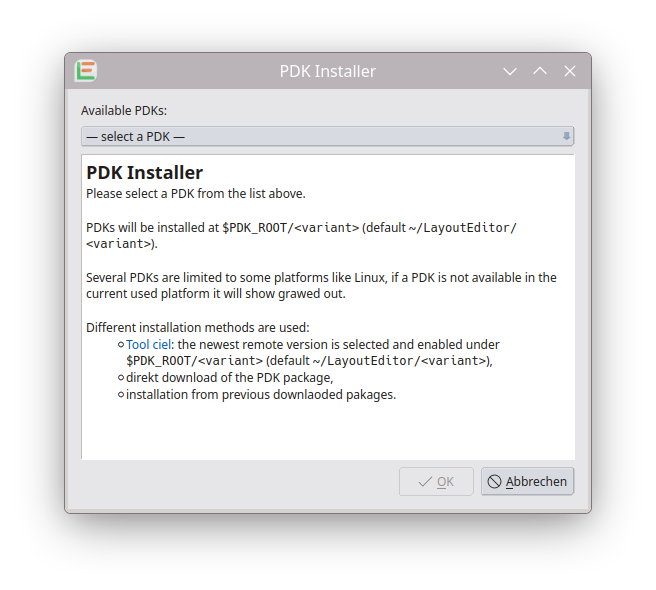
The PDK Installer installs Process Design Kits (PDKs) for the LayoutEditor and SchematicEditor and opens their libraries so you can start designing. It is the recommended way to set up open PDKs (SkyWater, GlobalFoundries GF180MCU, IHP, …), the training OpenCellLibrary, and X-Fab packages you have downloaded yourself.
Open it from the menu:
Utilities → Technology → PDK Installer
(available in the layout window and in the SchematicEditor)
How to use it
- Open PDK Installer.
- Choose a PDK from Available PDKs.
- Read the description in the text area (what the PDK is for, variants, install location).
- Click OK to install.
- Wait until the status messages finish. On success, the PDK is installed and its OpenPDK / schematic libraries are opened.
- Close the dialog (the Cancel button may show as Close after a successful install).
Entries that are not available on your operating system are shown greyed out (for example Linux only). You cannot select those on the current platform.
Where PDKs are installed
By default, kits are placed under:
$PDK_ROOT/<variant>If the environment variable PDK_ROOT is not set, LayoutEditor uses:
~/LayoutEditor/<variant>Examples: ~/LayoutEditor/sky130A, ~/LayoutEditor/gf180mcuD, ~/LayoutEditor/ihp-sg13g2.
You can set PDK_ROOT yourself before starting LayoutEditor if you want a shared or project-specific PDK tree.
Installation methods
Different PDKs use different install paths. The dialog picks the right one automatically.
ciel (open PDKs from the network)
Used for open kits such as SkyWater sky130A/B, GF180MCU A–D, and IHP SG13G2 (Linux and macOS).
ciel is a Python PDK version manager (formerly volare). On first use the installer may ask to install the ciel package into the LayoutEditor Python environment (pip). Then it:
- asks ciel for the newest remote version of that PDK family,
- downloads and enables it under
$PDK_ROOT/<variant>, - opens the resulting OpenPDK folder in LayoutEditor (schematic
.lellibraries and related tech files).
A working network connection is required. Large downloads can take several minutes.
Packaged library (.ltgz)
Used for OpenCellLibrary: the kit is unpacked from the LayoutEditor installation (openCellLibrary.ltgz in the library folder). No ciel download is required. Available on Linux, macOS, and Windows.
Previously downloaded packages (X-Fab)
Used for X-Fab Universal Installer (Linux only). You download the X-Fab archives yourself from my.xfab.com, put the related .tar.gz files into one folder, then choose that folder when the installer asks. Details and package naming are described under X-Fab.
PDKs offered in the list
| Entry | Typical use | Method | Platforms |
|---|---|---|---|
| SkyWater sky130A | Open digital / mixed-signal, no ReRAM | ciel | Linux, macOS |
| SkyWater sky130B | Same family with ReRAM | ciel | Linux, macOS |
| GF180MCU A–D | GlobalFoundries 180 nm open PDK (metal-stack variants) | ciel | Linux, macOS |
| IHP SG13G2 | IHP 130 nm BiCMOS open PDK (analog / RF) | ciel | Linux, macOS |
| OpenCellLibrary | Education / demo LayoutEditor PDK | packaged .ltgz |
Linux, macOS, Windows |
| X-Fab Universal Installer | Commercial X-Fab process PDKs you downloaded | local .tar.gz folder |
Linux |
Choose metal-stack or ReRAM variants carefully: do not mix incompatible variants in one tape-out. The description pane in the dialog explains each variant.
After installation
- Schematic libraries from the PDK appear in the Components panel (same as after Add Library on an OpenPDK directory).
- Technology / layer setup macros from the PDK (when provided) should be run as described for that kit—see also SkyWater and OpenCellLibrary.
- You can install more than one PDK; each lives in its own
$PDK_ROOT/<variant>folder.
If something fails (missing network, pip/ciel error, incomplete package folder), the dialog shows a warning with the tool output. Fix the reported issue and run the installer again.
Related pages
- OpenCellLibrary — training PDK details
- SkyWater Open Source PDK — usage notes for sky130
- X-Fab — download and package conventions for X-Fab
- Components — editing library devices after the PDK is open
- LEL — native library format used inside OpenPDK LayoutEditor folders
© 2026 juspertor GmbH