Class Reference layer
Setup class of a single layer. More...
Member
| int | blue() |
| void | disable() |
| void | enable() |
| int | get3dLevel() |
| int | get3dThickness() |
| int | getStyle() |
| int | green() |
| bool | isConductor() |
| bool | isEnabled() |
| bool | isVia() |
| bool | isVisible(int datatype) |
| int | mapToDatatype |
| int | mapToLayer |
| string | name |
| void | set3dView(int level,int thickness) |
| int | red() |
| void | setColor(string name) |
| void | setColor(int red, int green, int blue) |
| void | setCustomStyle(string style) |
| void | setDatatypesInvisible(int start, int stop) |
| void | setDatatypesVisible(int start, int stop) |
| void | setDatatypesVisibleAll() |
| void | setStyle(int style) |
| string | shortkey |
| bool | visible |
Detailed Description
A layer is the display and mapping setup of one layer number: name, colour, fill style, visibility and GDS/OASIS mapping. You do not construct a layer; the objects live in the static layers table as layers::num[5]. A change is global and applies to every open layout window. name, visible and shortkey are fields you can assign. setColor and setStyle change how shapes are painted; set3dView sets height and thickness for the 3d view and for capacitance extraction. enable / disable show or hide the layer in the dock and the menu, which is separate from visible on the drawing. In Python there is no num array; call layers.number(9) to get the same object.
Example:
layers::num[5].name = "Layer Number 5";
layers::num[5].setColor(0, 128, 255);
layers::num[5].setStyle(3);
layers::num[5].visible = true;
layers::num[5].set3dView(2, 500);
In Python:
layers.number(9).name = "layer nine"
layers.number(9).setColor(255, 0, 0)
Member Function Documentation
int layer::blue()
Returns: the blue part of the layer colour.
void layer::disable()
Disables the layer so it is not shown in the menus and toolbars.
void layer::enable()
Enables the layer so it is shown in the menus and toolbars.
int layer::get3dLevel()
Returns: the level of the layer in the 3d view.
int layer::get3dThickness()
Returns: the thickness of the layer in the 3d view.
int layer::getStyle()
Reads the fill style of the layer.
Returns: the style number. See setStyle for the available styles.
int layer::green()
Returns: the green part of the layer colour.
bool layer::isConductor()
Returns: true if the layer is a conductor.
bool layer::isEnabled()
Returns: true if the layer is enabled.
bool layer::isVia()
Returns: true if the layer is a via.
bool layer::isVisible(int datatype)
Returns: true if datatype is currently displayed.
int layer::mapToDatatype
If gds map layer or oasis map layer is active, the layer is mapped to this datatype. If the value is lower than 0, all datatypes are mapped and saved with datatype 0.
int layer::mapToLayer
If gds map layer or oasis map layer is active, the layer is mapped to this number.
string layer::name
The name of the layer.
void layer::set3dView(int level,int thickness)
Sets the height level and the thickness used for the 3d view and for calculations such as capacitance extraction.
int layer::red()
Returns: the red part of the layer colour.
void layer::setColor(string name)
Sets the RGB colour from name. name may be one of these formats:
- #RGB (each of R, G, and B is a single hex digit)
- #RRGGBB
- #AARRGGBB
- #RRRGGGBBB
- #RRRRGGGGBBBB
- A name from the list of colours defined in the SVG colour keyword names of the World Wide Web Consortium.
(introduced with release 202011122)
void layer::setColor(int red, int green, int blue)
Sets the colour of the layer.
| Parameter: | |
|---|---|
| red | red component |
| green | green component |
| blue | blue component |
void layer::setCustomStyle(string style)
Sets a custom fill style on the layer.
| Parameter: | |
|---|---|
| style | three comma-separated fields: fill pattern size in x, size in y, then the pattern. Each character of the pattern encodes 6 bits. Example: 6,6,aaaaa= is a 6×6 pattern with five clear lines and one solid line. |
| Pattern of Characters: | |||||||
|---|---|---|---|---|---|---|---|
| a | 000000 | q | 0000X0 | G | 00000X | W | 0000XX |
| b | X00000 | r | X000X0 | H | X0000X | X | X000XX |
| c | 0X0000 | s | 0X00X0 | I | 0X000X | Y | 0X00XX |
| d | XX0000 | t | XX00X0 | J | XX000X | Z | XX00XX |
| e | 00X000 | u | 00X0X0 | K | 00X00X | 1 | 00X0XX |
| f | X0X000 | v | X0X0X0 | L | X0X00X | 2 | X0X0XX |
| g | 0XX000 | w | 0XX0X0 | M | 0XX00X | 3 | 0XX0XX |
| h | XXX000 | x | XXX0X0 | N | XXX00X | 4 | XXX0XX |
| i | 000X00 | y | 000XX0 | O | 000X0X | 5 | 000XXX |
| j | X00X00 | z | X00XX0 | P | X00X0X | 6 | X00XXX |
| k | 0X0X00 | A | 0X0XX0 | Q | 0X0X0X | 7 | 0X0XXX |
| l | XX0X00 | B | XX0XX0 | R | XX0X0X | 8 | XX0XXX |
| m | 00XX00 | C | 00XXX0 | S | 00XX0X | 9 | 00XXXX |
| n | X0XX00 | D | X0XXX0 | T | X0XX0X | 0 | X0XXXX |
| o | 0XXX00 | E | 0XXXX0 | U | 0XXX0X | - | 0XXXXX |
| p | XXXX00 | F | XXXXX0 | V | XXXX0X | = | XXXXXX |
void layer::setDatatypesInvisible(int start, int stop)
Turns off visibility for datatypes from start to stop. Any previous visible-datatype setting is removed.
void layer::setDatatypesVisible(int start, int stop)
Shows datatypes from start to stop and hides all other datatypes.
void layer::setDatatypesVisibleAll()
Shows every datatype on this layer.
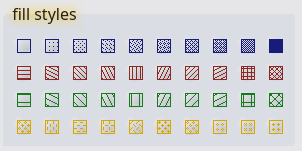
void layer::setStyle(int style)
Sets the fill style of the layer. Forty styles are supported:
row one has the style number 0 to 9 (from left to right), row two the number 10 to 19 and so on.
string layer::shortkey
Shortcut used for this layer in the layer-shortkey functions.
bool layer::visible
Visibility of the layer in the drawing. Assign true or false.
© 2026 juspertor GmbH